
Life After the Prototype
Your prototype looks great. Now what? The sequence from a throwaway demo to something engineering can actually ship.

A designer I talked to last week had just wrapped a design sprint. She had a real prototype to show for it. Clickable, demo-ready, the kind of thing that makes a stakeholder excited!
It also had nothing to do with her company’s design system. It looked like it, but it just wasn’t using anything worthy of shipping.
Her question was the one I keep getting. What is the right way to get from a throwaway prototype to something engineering can actually ship, without it eating another three months?
Most of the conversation about AI and design right now is stuck on whether the machine can generate a screen. It can. That was never the hard part.
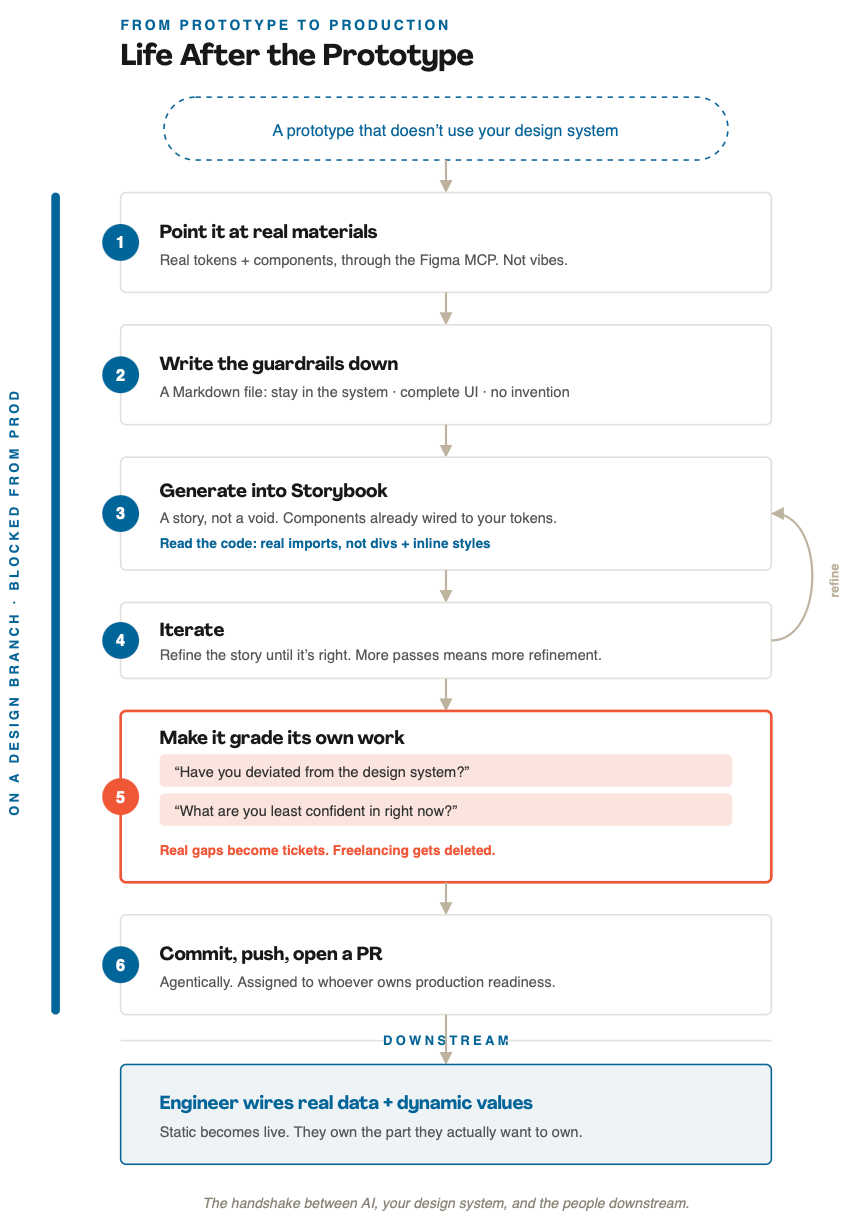
The hard part is the handshake. Between the AI, your design system, and the people downstream who have to turn it into a product. Here is the sequence I walk people through, and why each step earns its place.
The prototype is the easy part
This is the reframe that unlocks everything else.
A prototype that looks finished but uses none of your real components is not progress. It is a liability with good lighting. It looks shippable, so people assume it almost is, and then someone has to quietly rebuild it from scratch in the actual codebase. That rebuild is where your three months go.
So the goal is not a better-looking prototype. The goal is output that already lives inside your system, that an engineer can pick up without starting over. Everything below is in service of that.
Start on a branch you can’t break
Before any generation happens, set up the container.
Work on a dedicated design branch. One that is blocked from merging into anything that touches production. Nobody with design permissions can ship by accident, full stop.
This sounds like a boring operational detail. It is the most important step in the whole process. Because the branch is safe, you can let the AI be loose. Let it try things, make a mess, take ten passes. You never have to hold your breath, because there is no path from this branch to a customer. The safety on the outside is what buys you freedom on the inside.
Point it at real materials, not vibes
Now connect the model to your actual system. Real tokens. Real components. I do this through the Figma MCP so the model is reading from the same source of truth your designers and engineers already use, instead of guessing at what a button should be.
This is the line between vibe coding and something you can defend in review. A model with no access to your system will cheerfully invent a component. A model pointed at your real token and component architecture has somewhere true to stand.
Give it a visual reference too. A screenshot of the target screen works fine. You are not asking it to imagine the design. You are asking it to assemble one out of parts you already own.
Write the guardrails down
Put the rules in a Markdown file. Not in your head, not in a one-off prompt you will forget by Thursday. A file the agent reads every single time.
Mine say, more or less: stay inside the token and component architecture, do not deviate from it. Build complete UI, but do not invent anything that is not there. I want zero to one, not zero to one hundred.
That last line does more work than it looks like. Left alone, a model tends to either do the bare minimum or get excited and decorate. The guardrail file is you marking the lane before it starts driving, so “complete but restrained” is the default instead of a thing you have to fix on every pass.
Generate into Storybook, not a void
Here is where the setup pays off. Generate the screen as a Storybook story.
Storybook already holds a manifest of every component. Those components are already wired to your tokens and already styled. There is nothing for the model to fetch, nothing to fabricate, nowhere to wander off to. It builds from pieces that exist and already match.
Then read the code. You do not need to be an engineer for this. If it imported your actual components, good. If you see a wall of divs and inline styles, it went rogue and rebuilt your system from scratch instead of using it. That one tell is most of the game. Real imports mean it stayed home. Divs and inline styles mean it left.
Iterate on the story until it looks and behaves the way you want. More passes are fine here. More passes usually means more refinement, and refinement you actually understand because you watched it happen.
Make it grade its own work
This is the step almost everyone skips, and it is the one that changes the output.
When the screen finally looks right, do not accept it yet. Ask two questions.
First: have you deviated from the design system at all?
If it says no, great. If it says yes, ask where the gaps were and why. The answer is useful either way. Sometimes it deviated because something is genuinely missing from your system, and now you have found a real gap and can write the ticket. Sometimes it deviated because it decided something was a best practice and added it on its own. That is not a gap, that is the model freelancing. You just tell it to take it out. Either way, you learned something about your own system you did not know an hour ago.
Second, and this is my favorite question to ask any model in any session: what are you least confident in right now?
AI is your biggest hype man. Left to its own devices it will tell you everything is perfect and everything shipped. That question breaks the spell. It sends the model back through the session to second-guess itself, a little model judging the model. What comes back is often surprising, and it is usually the exact thing you would have caught in review three days later, after it was already a problem. You fix it on the spot and the quality takes a real jump.
There is a quiet bonus buried in this loop. It doubles as design system QA. Every time you run it, the AI shows you where your system is thin. You ship a screen and audit your foundations in the same pass.
Hand it off like an adult
Now you commit. Have the agent commit, push, and open a pull request, assigned to whoever owns production readiness downstream.
Be honest about what you are handing over. What you built is static. It is not wired to an API. An engineer still has to connect real data, deal with the repeater fields, swap static values for dynamic ones. But they already have the system built for exactly that, and that work is their craft. They want to own it.
So this is not AI replacing the engineer. It is a designer getting to a real, in-system eighty percent on a safe branch, and an engineer inheriting clean component-based code instead of a flat redline and a screenshot. The designer never had to touch a unit test. The engineer never had to reverse-engineer a prototype. Each person does the part they actually want to do.
That is the whole distinction, by the way, between a tool that supports the people in the lifecycle and a tool that quietly tries to stand in for them.
What actually holds this together
A few things, under all the steps.
Cycles are not failure. One-shot magic was never the goal. The point is refinement you can see and direct.
The real value is not generation. It is the gaps. The single most useful thing AI did in this entire process was tell me my system was missing pagination. Generating a screen is cheap now. Knowing where your system breaks is the expensive, valuable part, and this surfaces it for free.
And keep yourself in the chair as the judge. The model can assemble, check itself, and commit. It still has no idea what your product is for. You do. Every step here exists to keep a human deciding what is real.
The prototype was never the hard part. The handshake is. Get the sequence right and the distance between “this looks great” and “this is in production” stops being a quarter of rebuilding. It turns into an afternoon of refinement on a branch you can’t break.
Love this. Thank you for your incredible expertise and guidance for designers at such a critical time in our industry. 💕🙏🏻
Great reading! I’m wondering how this workflow adapts during the 0→1 phase.
Most of the time I’m using Cursor + Claude to rapidly prototype different interaction models, shape the overall UX, and refine detailed interactions, while someone else is developing the brand system that will eventually become the foundation of the UI.
I’d love a way for the prototype to evolve alongside the emerging visual language. So far, I haven’t found a good workflow beyond periodically rebuilding screens 1:1 as the visual language takes shape. Curious if you’ve found a better approach.
Thanks!