

I’ve spent years building with slots on the web components side. An area inside a component where you don’t predetermine what goes in it, you just define the contract and let content fill it. It’s one of those ideas that’s been kinda quietly load-bearing in code for a long time and never had a real equivalent on the design side.
That changed. Figma shipped native slots, and I think it’s one of the most underrated releases in the design systems space this year.
What a slot actually is
The easy way to misread slots is to treat them as a fancier swap instance. They’re not.
Swap instance gives you one known thing standing in for another known thing. You pick from a list of components someone already built.
Variants give you a finite set of states you control. Every possibility is enumerated ahead of time.
Slots give you a hole for content you don’t know yet, including content that doesn’t exist today. You’re not choosing from a menu. You’re defining a contract: whatever goes here has to behave a certain way, but what actually goes here is open.
That distinction sounds small. It isn’t. It’s the difference between a component that anticipates every future need up front and one that can absorb needs nobody has thought of yet.
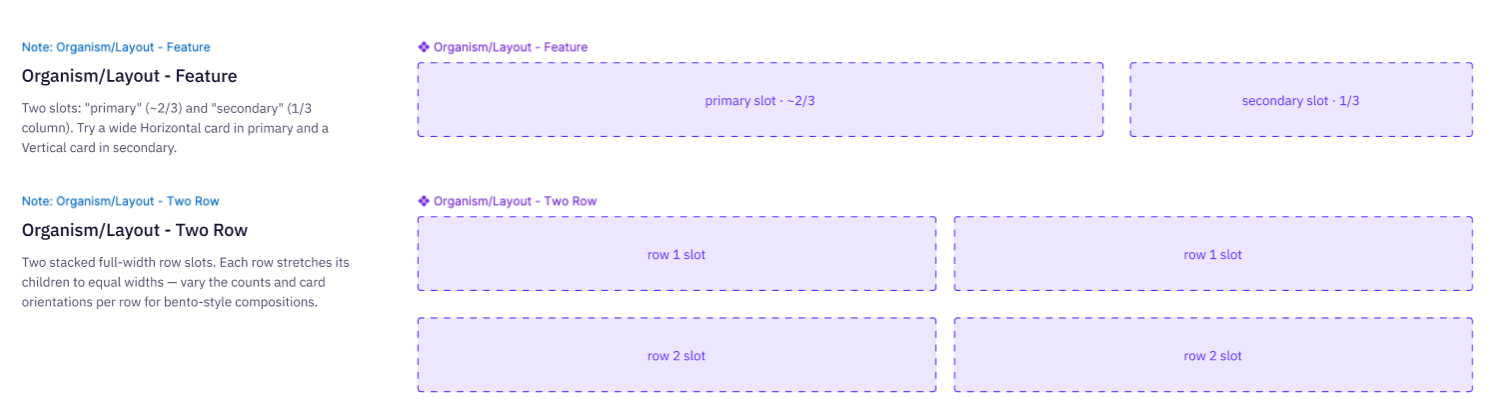
Where this actually matters: layout components
We talk about buttons and cards constantly. We don’t talk enough about layout components, and I think that’s where slots actually change how design systems get built.
A grid, a feature section, a card shell, a section header. These are components too. Before slots, making them genuinely reusable meant either a pile of variants trying to cover every combination, or designers detaching and rebuilding the same layout by hand every time they needed it slightly different. Neither scales.
With slots, a layout component becomes a real piece of infrastructure. Define the structure once, let content flow into named areas, and the layout holds up no matter what ends up inside it. That’s a genuinely different way of thinking about what a “component” is in a design system, and it’s a lot closer to how the code side has worked all along.
Nesting is where it gets interesting
The part that got me most excited: you can build this structure in layers. A layout component has a slot. Drop a slot-enabled card component into that slot. The card has its own slot. Drop a button group into that. Figma doesn't let you literally nest a slot inside a slot, but a slot-enabled component instance can go inside another slot, and that's a cool trick! You end up with structure inside structure, all still fully editable, still connected to the source components, nothing detached. Slot inception!
The attached demo video shows this in live action. Starting from primitive components, building up through layout components with slots, cards slotting into layouts, button groups slotting into cards, and a section header with an editor’s-pick style layout at the end. If you’ve mostly heard about slots in passing, seeing it built live makes the idea click a lot faster than reading about it does.
Worth reading from Figma directly
Two Help Center pages are worth the ten minutes if you want the details straight from the source:
What’s next
Part two takes this same structure into code. Same layout components, same slot contracts, rebuilt in Storybook, to see how cleanly the concept actually translates and where it doesn’t.
If you’ve been putting off learning slots, this is the sign. Go build something with them.


